
To fully activate all features of the WPEA ACF Events Addon, follow the steps below to import the required ACF field group and plugin mapping settings.
If you already have ACF installed and your event-related fields are already created, you can skip the field group import and directly map your existing fields using the mapping tool on the ACF Fields Mapping page.
Compatibility: The WPEA ACF Events Addon works seamlessly with both ACF Free and ACF Pro – no extra configuration needed.
Where to find the JSON files: Both required JSON files are bundled inside the plugin folder atwpea-acf-events-addon/json_data_files/.
Step 1: Import ACF Field Group (ACF Plugin)
- Go to your WordPress dashboard.
- Navigate to: ACF > Tools > Import
- Click on Choose File and select the file:
acf-events-fields.json - Click the Import JSON button.
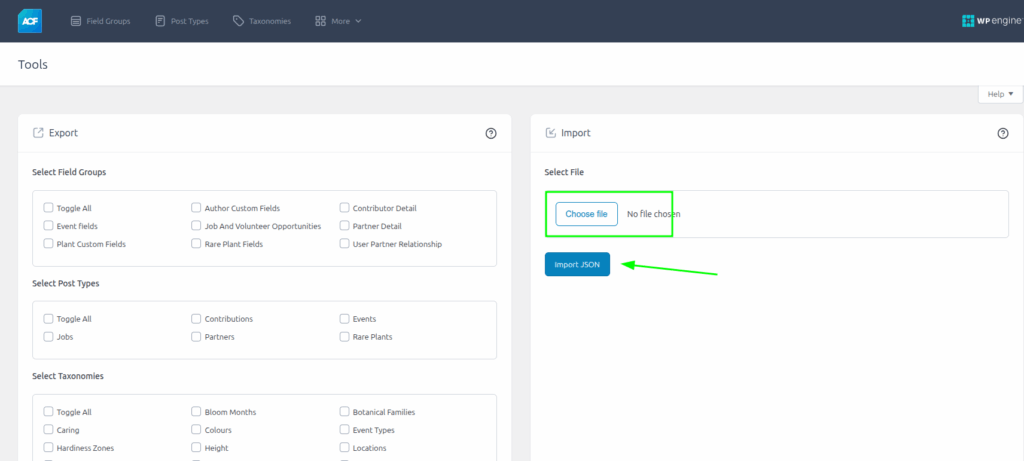
This will load all the required ACF field groups used by this addon, including custom post types, taxonomies, and associated fields.
Step 2: Import Plugin Field Mapping (WPEA Addon)
- After activating the WPEA ACF Events Addon, go to: ACF Events Addon > Import Mapping tab.
- Click inside the upload area or drag the file:
wpea-events-mapping.json - Click on the Import Mapping File button.
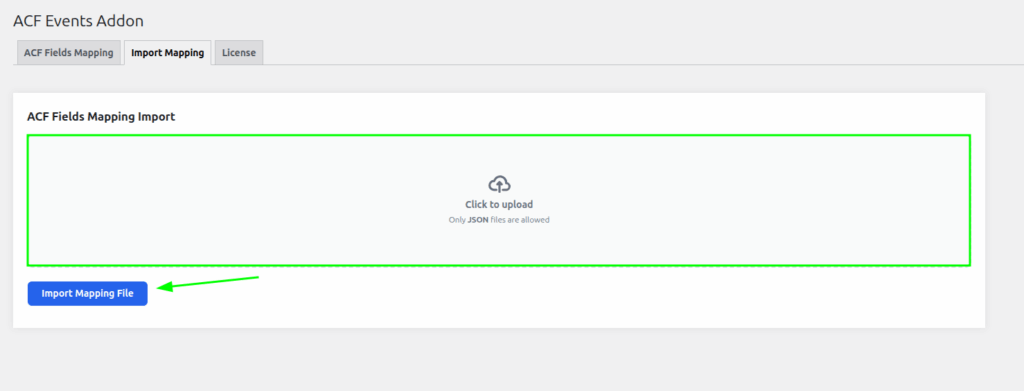
Once imported, the addon will be fully configured and ready to use. You can now start importing events into the ACF Events setup.