
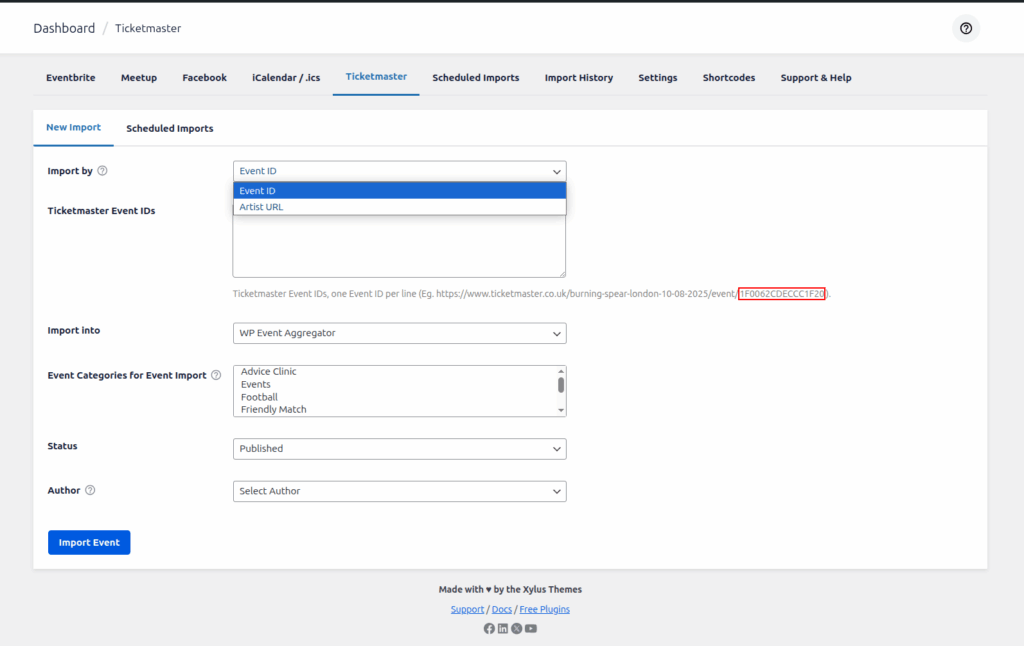
Ticketmaster Event ID : If you are importing from someone else’s Ticketmaster account, then you can use this option to import the event using the ID number of the event. The ID number for an event is the string of numbers located in the ticketmaster.co.uk URL for an event .you can get Event ID from ticketmaster.co.uk

Now you see event you get id of particular event on click of that event.
Copy this ID and enter it in the large Ticketmaster Event ID field (noting you can actually add lots of different IDs – just place them on separate lines).
Import Into : You choose WP Event Aggregator into drop-down.
Event Categories for Event Import: This option helps you import events and assign them to the chosen categories.
Status: This option allows you to easily import events into the selected event status.
Author: This option allows you to easily assign the imported event to a specific author.
Once you have everything configured, click the Import button and your events will be added to WP Events.
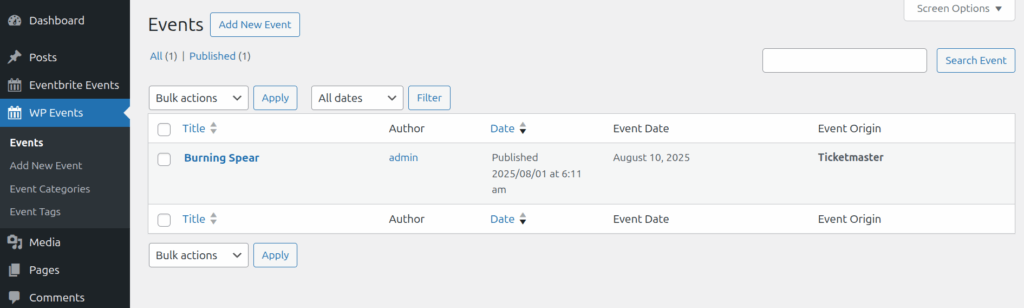
You can see events on WP Events. so this way you import your Ticketmaster event using Ticketmaster Event ID .