1. Home
  2. WPEA Eventchamp Addon
  3. Plugin Installation

Plugin Installation

This plugin can be installed directly from your WordPress site.

Step 1:

We have introduced the WPEA EventChamp Addon as an add-on for WP Event Aggregator. Therefore, you need to install both the Free and Pro versions of WP Event Aggregator to use this addon. You can learn how to install WP Event Aggregator (Free and Pro) from Here.

Step 2:

Download the “WPEA EventChamp Addon” plugin from your profile on https://xylusthemes.com/.

Step 3:

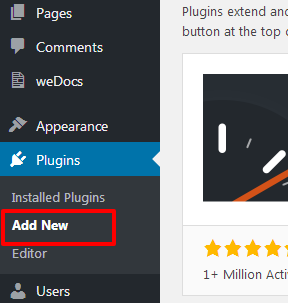
Log in to your WordPress dashboard and navigate to Plugins > Add New Plugin.

Step 4:

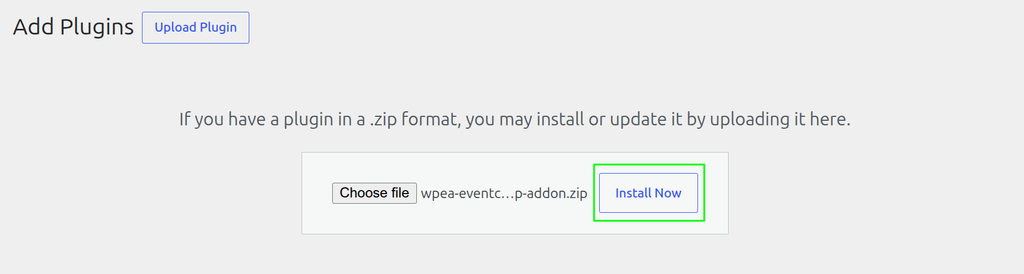
Click the Upload Plugin button, upload the “WPEA EventChamp Addon” ZIP file, and click the Install Now button.

Step 5:

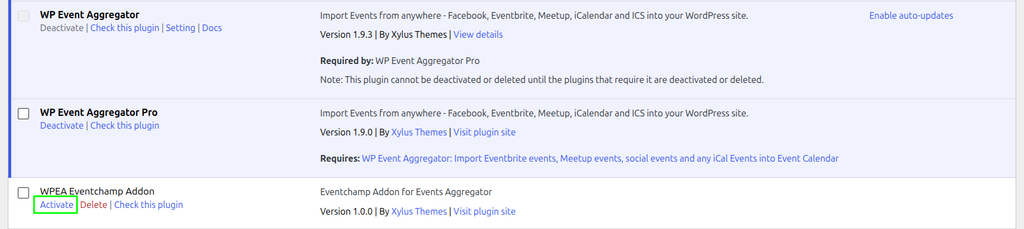
After the installation is complete, locate “WPEA EventChamp Addon” in the plugins list and click the Activate link.

Was this article helpful to you? Yes No

How can we help?