
The fields in the Source tab change depending on which Platform you selected in Step 1 of the builder. Open Event Aggregator > Live Feed > (your feed) > Source tab.
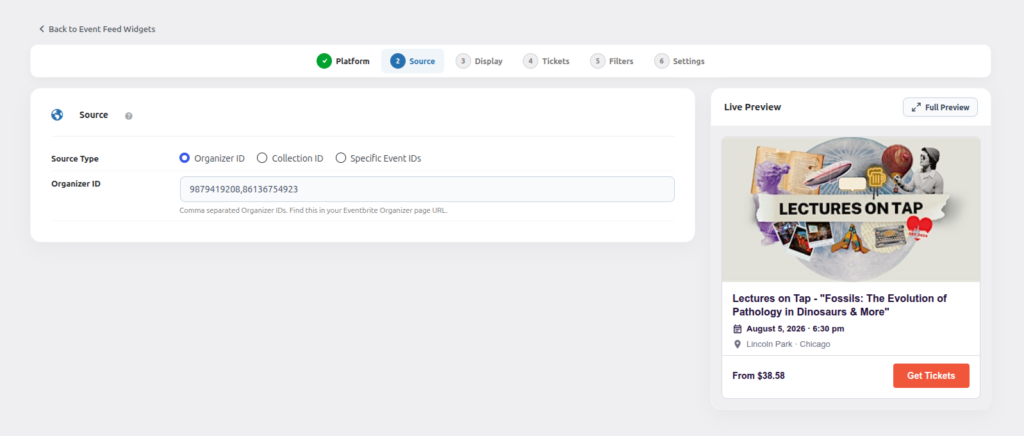
Eventbrite
Eventbrite — Organizer ID
Pull every public event created by one or more Eventbrite Organizers.
Example: 12345678, 87654321 — comma separated for multiple organizers.
Eventbrite — Collection ID
Pull events from one or more specific Eventbrite Collections.
Example: 987654, 456789
Eventbrite — Specific Event IDs
Enter one or more comma separated Eventbrite Event IDs when you only want specific events instead of an Organizer’s full list.
Example: 111111111, 222222222
Meetup
Meetup — Group ID
Enter the Meetup group slug (from the group URL, e.g. meetup.com/your-group-slug).
Example: wp-event-aggregator-pro, your-group-slug — comma separated for multiple groups.
Meetup — Specific Event IDs
Enter one or more comma separated Meetup Event IDs to show only those events.
Example: 111, 222, 333
Facebook — Event IDs
Enter one or more comma separated Facebook Event IDs when you only want to display specific events.
Example: 3124795954373363, 1531644045138212
Facebook — Page Username / ID
Enter the username slug or numeric ID of any public Facebook Page.
Example: xylusinfo or a numeric Page ID.
Facebook — Group URL / ID
Enter the full URL or numeric ID of a public Facebook Group.
Example: https://www.facebook.com/groups/629555443733186 or just 629555443733186.
Note: the group must be public. Private/closed groups cannot be read without login.
Facebook — iCal URL
Enter your Facebook iCal export URL to sync events from a calendar export.
Example: https://www.facebook.com/events/ical/upcoming/?uid=...&key=...
How it works behind the scenes
The Live Feed reads publicly visible event information directly from the source you provide, for all three platforms — there’s nothing to authorize and no API keys to manage. Because it depends on public data, always double-check that the Organizer/Group/Page you enter is set to public visibility.
Every field above accepts multiple comma (or line) separated values, so you can pull events from more than one Organizer, Group or Page into a single feed.