
Open the Display tab in your Live Feed builder to control how each event card looks.
Available layouts
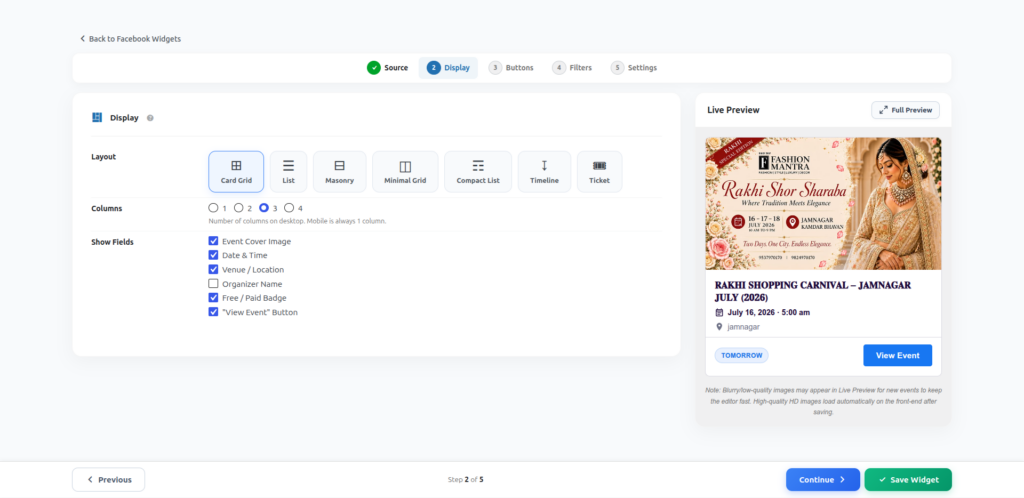
- Card Grid — image-led cards in a responsive grid.
- List — a simple vertical list, good for sidebars.
- Masonry — Pinterest-style staggered grid.
- Minimal Grid — clean, text-focused grid with small thumbnails.
- Compact List — condensed rows, ideal for showing many events at once.
- Timeline — a vertical date-based timeline.
- Ticket — a ticket-stub style card, great for paid/ticketed events.
Note: Card Grid and List are included in the free plugin. Masonry, Minimal Grid, Compact List, Timeline and Ticket layouts need the Pro version.
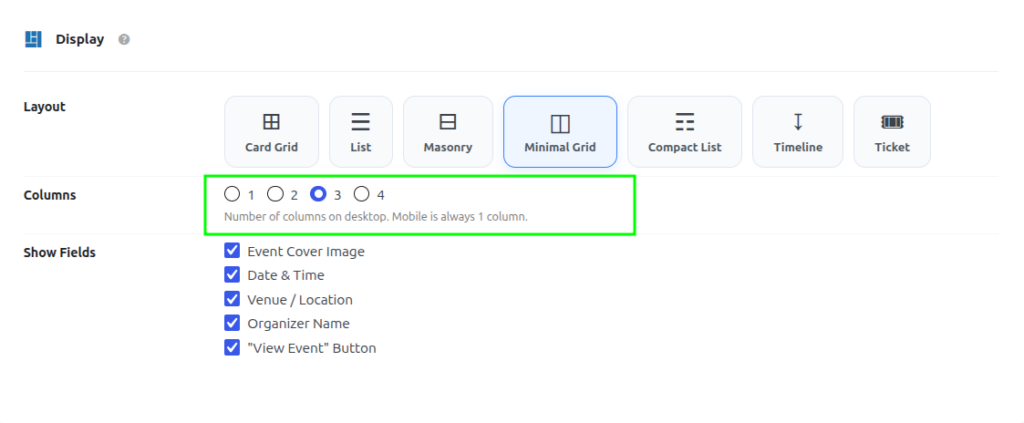
Columns
Choose 1, 2, 3 or 4 columns for desktop. On mobile, the feed always automatically switches to a single column for readability.
Show/hide fields
Toggle which pieces of information appear on each event card:
- Event Cover Image
- Date & Time
- Venue / Location
- Organizer Name
- “View Event” Button
Uncheck anything you don’t want visible — the layout automatically adjusts its spacing.