
The Source tab of the Live Feed builder decides where events are pulled from. Open Facebook Events > Live Feed > (your feed) > Source tab.
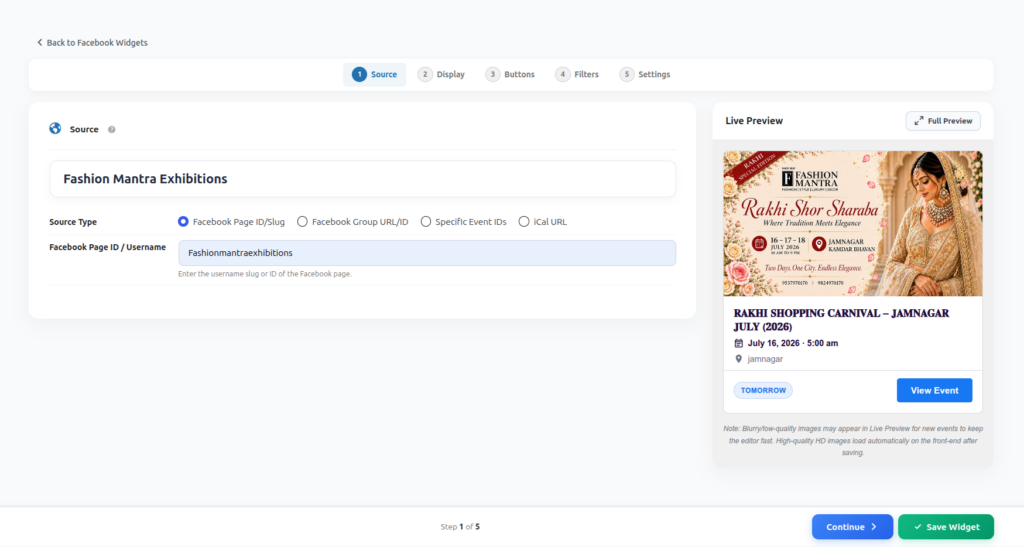
Facebook Page ID/Slug
Enter the username slug or numeric ID of any public Facebook Page.
Facebook Page ID / Username field — example: Fashionmantraexhibitions or a numeric ID.
Facebook Group URL/ID
Enter the full URL or numeric ID of a public Facebook Group to pull its events.
Example: https://www.facebook.com/groups/629555443733186 or just 629555443733186.
Note: the group must be public. Private/closed groups cannot be read without login.
Specific Event IDs
Enter one or more comma-separated Facebook Event IDs when you only want to display specific events instead of a Page’s full list.
Example: 3124795954373363, 1531644045138212
iCal URL
Enter your Facebook iCal export URL to sync events from a calendar export.
Example: https://www.facebook.com/events/ical/upcoming/?uid=...&key=...
How it works behind the scenes
The Live Feed reads publicly visible event information directly from the source you provide — there’s nothing to authorize and no API keys to manage. Because it depends on public page data, always double-check that the Page/Group you enter is set to public visibility.