
Protecting your site legally matters just as much as protecting it from spam. The Compliance tab helps you add the consent checkboxes many privacy regulations expect, without touching any code.
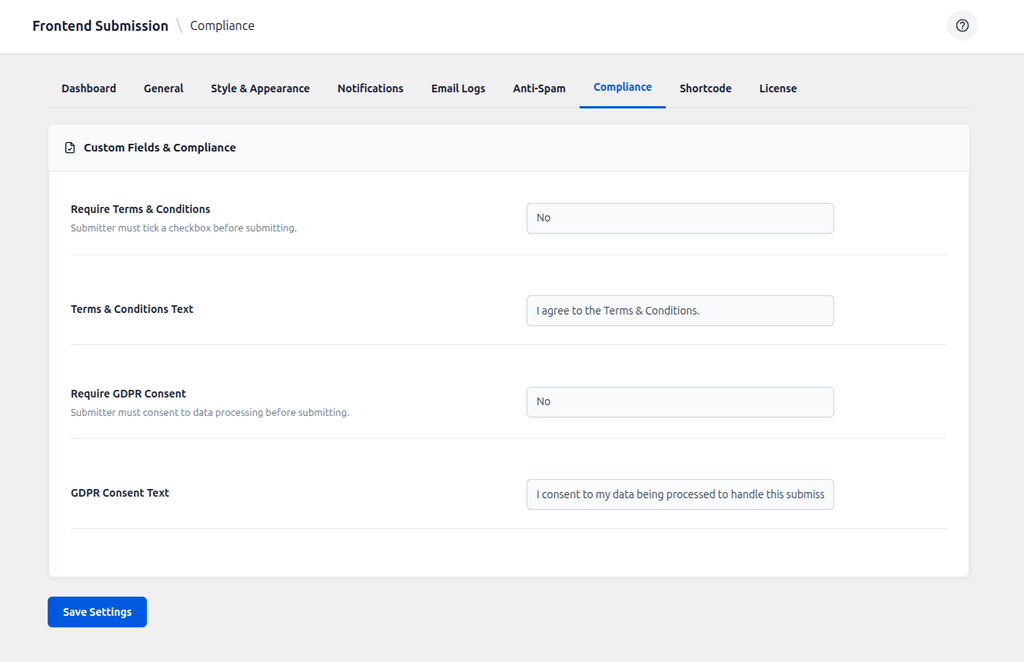
Require Terms & Conditions
If you have rules about what kinds of events are allowed on your site, turn this on. It adds a mandatory checkbox above the Submit button — users cannot submit the form until they tick it.
Terms & Conditions Text
Enter the Terms & Conditions text you want to display next to the checkbox. The text you add here will appear directly next to the checkbox.
Require GDPR Consent
If you have visitors from the EU/UK, GDPR generally expects explicit consent before processing personal data. Enabling this adds a second, separate mandatory checkbox for that consent.
GDPR Consent Text
Explain plainly why you need their data, e.g. “I consent to my data being stored and processed solely for the purpose of managing this event submission.” Being transparent here builds trust and reduces support questions.
This page is provided for guidance only and isn’t legal advice — check with a professional to confirm what your specific site and audience require.